Use case · Car loan broker
A car loan broker flow: application, checks, then a page of matching lenders
Send a car buyer one link. They describe the car and the loan, say whether they borrow as a person or as a company, and the flow runs the right checks: identity verification for a person, registry and screening for a company. A clean case ends on a page of matching lenders, each a deep link that carries the application over. A flagged case waits for your review desk instead.
- One form for the car, the loan and the borrower
- Person: identity check. Company: registry and screening
- Clear cases land on a lender page with deep links
What does the car buyer actually do?
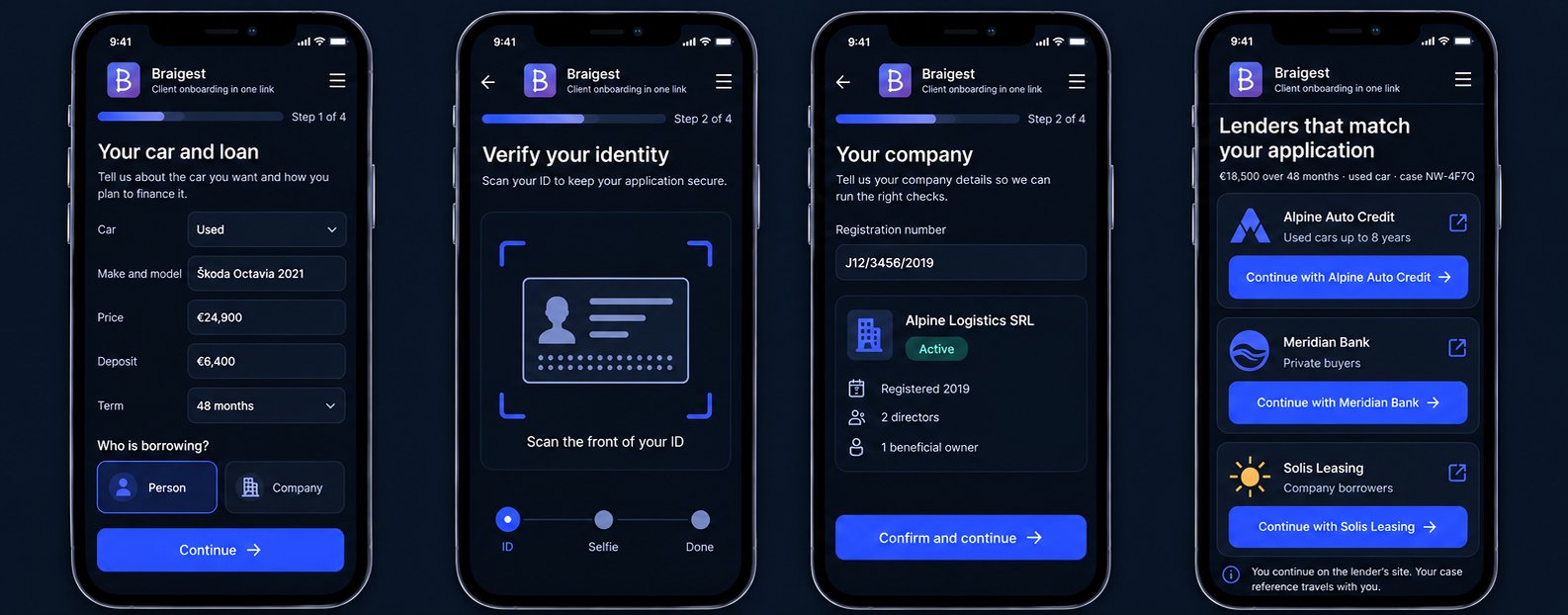
They open the link on their phone. The first screen asks about the car: new or used, price, deposit, term. The second asks who is borrowing. A person types their name, address and income and, when the flow asks, scans an ID and takes a selfie inside the same screen. A company enters its registration number and the person representing it. At the end they read the lender page, pick one, and continue on that lender's own site with their details already carried across.
- Car details: model, price, deposit, term
- Borrower: person or company, one choice
- ID scan and selfie only when the flow asks for it
- A lender page with a button per matching lender
How does the flow decide which checks to run?
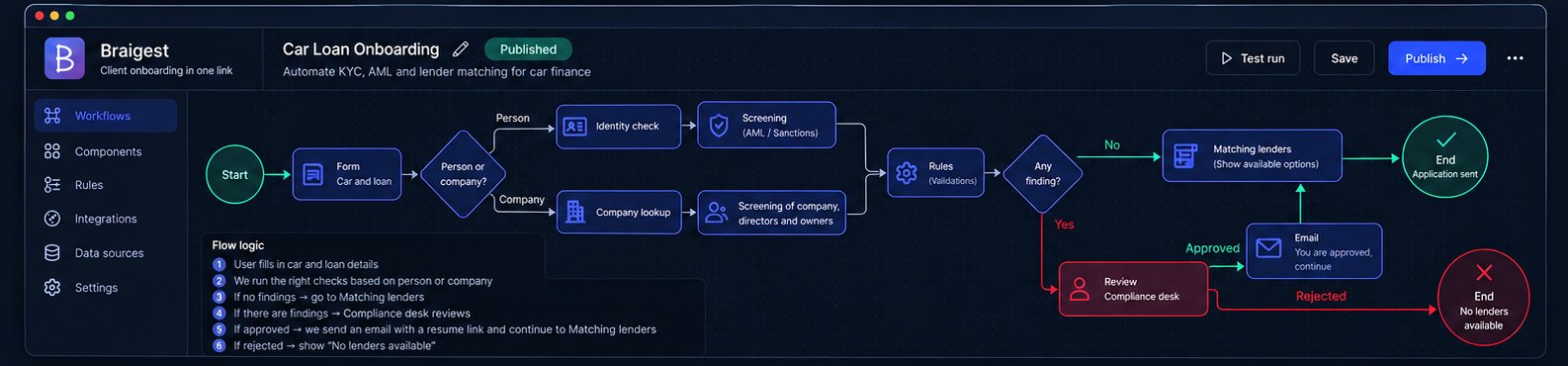
A Decision step reads the "person or company" answer and sends the run down one of two paths. The person path runs identity verification through Didit or Onfido and a sanctions and PEP screening through Dilisense on the verified name. The company path looks the company up in the business register, pulls its directors and beneficial owners, and screens the company and those people. Nothing is guessed from the form. Each screening subject is a named binding you set once in the builder.
- Person: identity verification, then screening on the verified name
- Company: registry lookup, then screening of the company, directors and owners
- A rule step compares what was declared with what the register says
What happens when a check is not clean?
A screening hit, a company that is not active, or a mismatch between the declared owner and the register raises a finding on the case. The run does not show the lender page. It parks in the built-in review desk, where a reviewer sees the finding, the provider result and the answers side by side and decides. On approval, an email with a resume link brings the applicant back to the lender page. Each End of the flow carries its own verdict, so "approved" and "declined" are separate exits, and the compliance status is recorded by the path the run took, not by a click.
- Findings block the lender page until a reviewer decides
- Approved and declined are separate flow exits with their own verdict
- Every check result, decision and reviewer action stays in the audit trail
How does the lender page work?
It is a Content screen you author in the builder: a heading, a short explanation and one button per lender. Each button links out to that lender's own application page, and the link carries the application in its query string: the loan amount, the term, and a case reference, taken from placeholders bound to the answers already collected. You write the list of lenders once. Different Decision branches can lead to different lender pages, so a company borrower or a used car over a certain age sees a different set than a first-time private buyer. Prefer passing a case reference over raw personal data in the link; the lender can call back for the full case.
- One button per lender, each a deep link to the lender's own site
- Placeholders in the link filled from the application: amount, term, case id
- Different branches, different lender pages
What do you get back as the broker?
One case per applicant: the car and loan answers, the identity result or the registry record, the screening outcome, any finding and who resolved it, and which lender the buyer clicked. If your intermediation agreement or GDPR notice is part of the flow, it comes back filled from the same answers, signed and sealed with an evidence page. Delivery is by webhook, REST or email into your CRM or lender portal, and the case stays reviewable in one place.
- Which lender button the buyer clicked, recorded on the case
- Signed intermediation agreement, when you add the document step
- Delivery by webhook, REST or email
How long does it take to set this up?
Describe the flow in a sentence and the AI builder drafts it: the form, the person or company decision, the checks on each path, the review gate and the lender page. You then fill in the lender links and the provider connections and publish. Changing a lender, a threshold or a question is an edit and a new version, not a project. The AI builder is on Practice at €149 a month and above; a broker running one flow with the checks configured by hand fits Solo at €29 a month.
Frequently asked questions
Can the lender page show different lenders to different applicants?
Yes. The page is a step in the flow, and Decision branches choose which page the run reaches. A company borrower, a used car above a set age or a loan above a set amount can each land on its own lender list.
Do the lender links carry the applicant's details?
Only what you bind. Each link is a fixed lender address plus a query string built from placeholders you map to specific answers, such as amount, term and a case reference. Passing a case reference instead of personal data keeps the link clean and lets the lender fetch the full case.
Which checks run on a company borrower?
A business register lookup returns the company status, registered address, directors, shareholders and beneficial owners. A screening step then checks the company and those people against sanctions and PEP lists, and a rule step compares what the applicant declared with what the register says.
What if the identity check fails or the applicant abandons it?
The run waits on that step. You choose per flow whether an unverified applicant may continue. A reminder email with a resume link can go out after a set time, and the run is marked abandoned after a deadline you set, so no case waits forever.
Is this a credit decision?
No. Braigest runs the intake, the identity or company checks and the routing, and records what happened. The credit decision stays with the lender the applicant continues to, or with your own underwriting.
Explore more of the platform
See the car loan broker flow built live
Bring your list of lenders and the application form you use today. In 30 minutes we build the flow up to the lender page.